Getting Started
This guide walks you through your first successful API call in under 5 minutes.
1. Obtain Sandbox credentials
After contacting our onboarding team, they can provide you the credentials for our Sandbox enviroment. Here you can try out the API and perform payments without charging your accounts.
With the credentials you can:
Note
Use sandbox credentials when experimenting with the Try It feature.
2. Make Your First Request, Authentication
Note
The use of the User-Agent header is required.
Obtain an access-token that is required for subsequent calls:
curl --request POST \
  --url https://api.sbx.globadyme.com/api/api/auth/sign-in \
  --header 'Accept: */*' \
  --header 'Content-Type: application/json' \
  --header 'User-Agent: curl/7.81.0' \
  --data '{
  "user": {
    "username": "user@example.com",
    "password": "your super secret password"
  }
}'
Response:
{
  "accessToken": "eyJhbGciOiJIUzI... (shortened for readability) ...5buNiPnwYwyVjVaRfnMestLIqPOyC4K3PFO_217gg",
  "tokenType": "Bearer",
  "refreshToken": "d0dfeb2d-eba8-48c6-9f83-cc13c2a8afe1",
  "userId": "c414f238-01d8-449c-8dc6-2d3c9244a889",
  "merchantName": "Actieve Harry",
  "hasTree": false,
  "canPostTree": false
}
3. Request a payment
curl --request POST \
  --url https://api.sbx.globadyme.com/api/globadymeGateway/transaction/v2/requestPayment \
  --header 'Accept: application/json, */*' \
  --header 'User-Agent: curl/7.81.0' \
  --header 'Authorization: Bearer eyJhbGciOiJIUzI... (shortened for readability) ...5buNiPnwYwyVjVaRfnMestLIqPOyC4K3PFO_217gg' \
  --header 'Content-Type: application/json' \
  --data '{
    "amount": "12.34",
    "currency": "EUR",
    "country": "NL",
    "emailAddress" : "chappy@payhap.py",
    "description": "Interesting payment",
    "accountHolderName": "Chappy Payhappy",
    "redirectUrlSuccess": "www.example.org/success"
}'
Response:
{
  "message": "OK",
  "details": {
    "requestId": "73d234d1-5ca6-45b0-9e7d-a5b522bc92d9",
    "redirectUrl": "https://sandbox.globadyme.com/pay?data=0f628643a49... (shortened for readability) ...bf1e9f8d536c546cb"
  }
}
Note
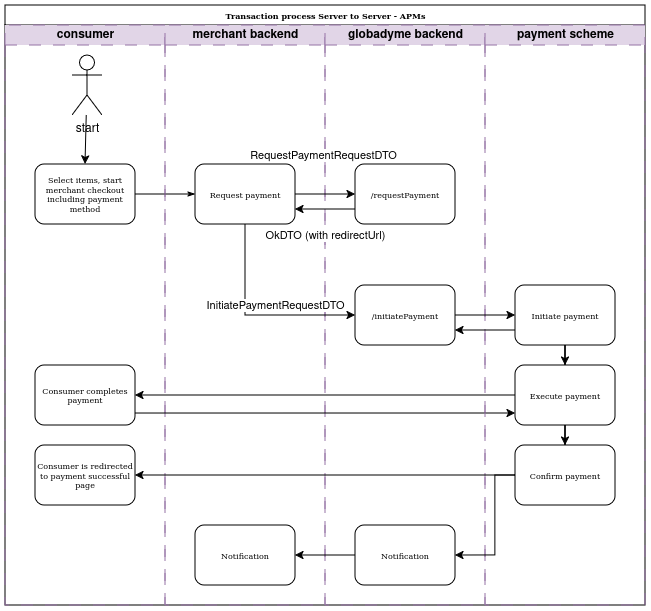
The flow is explained in more detail in Integration documentation under Step 3a and 3b.
4. Understand the Flow
5. Explore the API
Head to the API Reference and use Try It to experiment with endpoints directly in your browser.